Notebook
Trying agentgateway MCP guardrails with CEL expressions
A practical look at using the CEL-based MCP guardrails introduced in agentgateway v1.7.0 to control tool listings, inputs, and outputs without an external ExtMCP server.
Guide
Contents
In the previous article, Trying agentgateway MCP guardrails with ExtMCP, I inspected MCP requests and responses through an external ExtMCP server. That article used agentgateway v1.6.0-alpha.2 and implemented the guardrail decisions in a separate gRPC server.
agentgateway v1.7.0 added a CEL processor for MCP guardrails. It lets you define conditions and actions in Common Expression Language (CEL), then reject or transform MCP requests and responses inside the agentgateway process. No external guardrail server is required.
This article uses agentgateway v1.7.0 to implement controls similar to those in the previous article with CEL expressions.
- Remove tools that should not be exposed from
tools/listresponses - Reject
tools/callinputs that contain a specific string - Append a verification marker to
tools/callresponses
The behavior is verified with MCP Inspector.
Architecture
The request flow is as follows.
MCP Inspector
  ↓ Streamable HTTP
agentgateway :3000
  ├─ CEL guardrails
  ├─ everything MCP server
└─ GitHub MCP serverThe ExtMCP setup called an external gRPC server from agentgateway. This setup evaluates CEL expressions inside agentgateway, so it does not need a separate guardrail server.
Configure CEL expression guardrails
The following configuration is used in this article.
mcp:
  port: 3000
  policies:
    cors:
      allowOrigins: ["*"]
      allowHeaders: ["*"]
      exposeHeaders: ["Mcp-Session-Id"]
    mcpGuardrails:
      processors:
        # Expose only the two tools allowed in the ExtMCP article.
        # Target-name prefixes are present in tools/list responses.
        - kind: expression
          methods: {"tools/list": response}
          condition: has(mcp.result.tools)
          transform: >-
            mcp.result.with(r, r.merge({
              'tools': r.tools.filter(tool,
                tool.name == 'everything_echo' ||
                tool.name == 'github_get_me'
              )
            }))

        # Reject an echo call before forwarding it to the MCP server when
        # its message contains forbidden. The resolved tool name in this
        # phase does not include the target-name prefix.
        - kind: expression
          methods: {"tools/call": request}
          condition: >-
            mcp.params.name == 'echo' &&
            has(mcp.params.arguments) &&
            has(mcp.params.arguments.message) &&
            mcp.params.arguments.message.contains('forbidden')
          reject: "echo arguments contain forbidden"

        # Append a verification marker to each text block returned by echo.
        - kind: expression
          methods: {"tools/call": response}
          condition: >-
            mcp.tool.name == 'echo' &&
            has(mcp.result.content)
          transform: >-
            mcp.result.with(r, r.merge({
              'content': r.content.map(item,
                item.type == 'text'
                  ? item.merge({'text': item.text + ' checked by agentgateway CEL'})
                  : item
              )
            }))

  targets:
    - name: everything
      stdio:
        cmd: npx
        args: ["-y", "@modelcontextprotocol/server-everything"]
    - name: github
      mcp:
        host: https://api.githubcopilot.com/mcp/
      policies:
        backendAuth:
          key:
            value: ${GITHUB_PAT}
            location:
              header:
                name: Authorization
prefix: "Bearer "A processor with kind: expression runs its reject or transform action when its condition evaluates to true.
The processors and phases used here are as follows.
| MCP method | Phase | Action |
|---|---|---|
tools/list | response | Limit the exposed tools to two |
tools/call | request | Reject an echo input containing forbidden |
tools/call | response | Append a marker to the echo text result |
Processors run in order, and each processor sees changes made by earlier processors. When combining a rejection rule with a masking rule, order them according to which rule must inspect the original value.
Start agentgateway and MCP Inspector
Set the Personal Access Token used to connect to the GitHub MCP server.
export GITHUB_PAT="github_pat_xxx"Save the configuration as config.yaml and start agentgateway.
agentgateway -f config.yamlStart MCP Inspector in another terminal.
npx -y @modelcontextprotocol/inspector \
  --transport http \
--server-url http://localhost:3000/mcpIn Inspector, connect to http://localhost:3000/mcp with the Streamable HTTP transport.
Filter the tools/list response
The first processor inspects the aggregated tools/list response from the configured targets.
- kind: expression
  methods: {"tools/list": response}
  condition: has(mcp.result.tools)
  transform: >-
    mcp.result.with(r, r.merge({
      'tools': r.tools.filter(tool,
        tool.name == 'everything_echo' ||
        tool.name == 'github_get_me'
      )
}))mcp.result contains the result returned by the MCP backends. The expression uses with and merge to preserve the original object while replacing only tools with the filtered list.
When multiple targets are multiplexed, tool names exposed to the client include the target-name prefix. The expression therefore compares against everything_echo instead of echo, and github_get_me instead of get_me.
After retrieving the tool list in MCP Inspector, only these two tools are displayed.
everything_echogithub_get_me
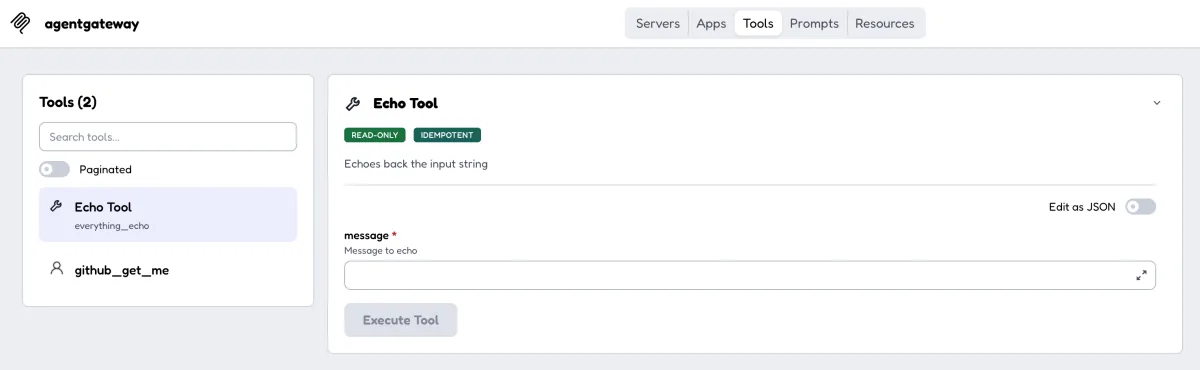
This processor transforms the tools/list response. It does not prevent agentgateway from connecting to targets whose tools are not exposed. To control target selection or authorize tool execution as well, consider combining this approach with target conditions or MCP authorization.
Reject a tools/call input
The next processor rejects the request when the message passed to everything_echo contains forbidden.
- kind: expression
  methods: {"tools/call": request}
  condition: >-
    mcp.params.name == 'echo' &&
    has(mcp.params.arguments) &&
    has(mcp.params.arguments.message) &&
    mcp.params.arguments.message.contains('forbidden')
reject: "echo arguments contain forbidden"The client sees the tool as everything_echo, but request-phase mcp.params.name contains the resolved tool name without the target-name prefix: echo.
Accessing a missing field causes CEL evaluation to fail. The expression therefore uses has to check that arguments and message exist before inspecting the value.
Call everything_echo from MCP Inspector with the following arguments.
{
  "message": "forbidden value"
}The request is not forwarded to the Everything MCP server. Instead, it returns a tool execution error with this message.
echo arguments contain forbidden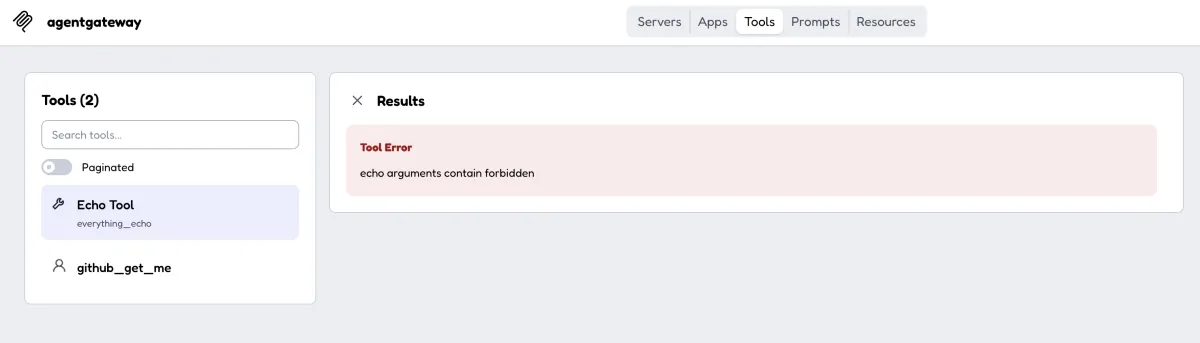
A normal tools/call rejection is returned as a tool result with isError: true, rather than as a top-level JSON-RPC error.
Transform a tools/call response
The final processor appends checked by agentgateway CEL to each text block returned by echo.
- kind: expression
  methods: {"tools/call": response}
  condition: >-
    mcp.tool.name == 'echo' &&
    has(mcp.result.content)
  transform: >-
    mcp.result.with(r, r.merge({
      'content': r.content.map(item,
        item.type == 'text'
          ? item.merge({'text': item.text + ' checked by agentgateway CEL'})
          : item
      )
}))content can contain blocks other than text. The expression changes only items whose type is text and returns every other item unchanged.
Call everything_echo from MCP Inspector with these arguments.
{
  "message": "Hello"
}The expression appends the marker to the Echo: Hello result returned by the Everything MCP server.
Echo: Hello checked by agentgateway CEL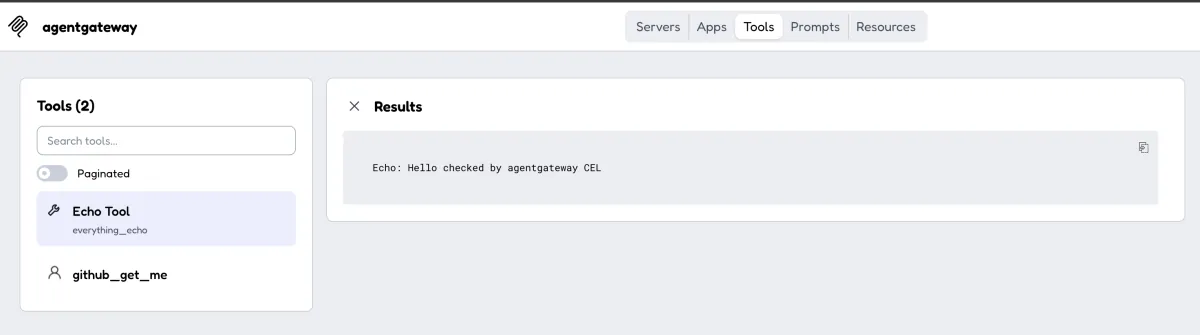
Because the condition includes mcp.tool.name == 'echo', responses from other tools such as github_get_me are not changed.
Choosing between ExtMCP and CEL expressions
Value inspection and JSON object transformations like the ones in this article can be implemented entirely with CEL expressions.
| Consideration | CEL expressions | ExtMCP |
|---|---|---|
| Execution location | Inside agentgateway | External gRPC server |
| Setup and operation | A configuration file is sufficient | Requires implementing and operating a server |
| Best suited for | Simple conditions, rejection, and transformation | External integrations, stateful processing, and complex decisions |
| Failure behavior | Expression evaluation errors fail closed | Configurable with failureMode |
You can also keep static rules in CEL expressions and use ExtMCP only for decisions that require external data or more complex logic.
Summary
This article used agentgateway's CEL expression guardrails to implement the following controls without an external ExtMCP server.
- Limit the
tools/listresponse toeverything_echoandgithub_get_me - Reject an
echoinput containingforbiddenbefore forwarding it to the backend - Append
checked by agentgateway CELto theechotext result
Request and response phases expose different values to CEL expressions. In addition, tool names exposed to clients gain target-name prefixes when multiple targets are configured. Checking the actual names and results in MCP Inspector while building an expression helps avoid unintended gaps in validation.
For more details, see the agentgateway documentation for MCP guardrail processors and setting up CEL guardrails.
Related notes
Read next
Trying agentgateway MCP guardrails with ExtMCP
A practical look at inspecting and mutating tools/list and tools/call with ExtMCP CheckRequest and CheckResponse, using agentgateway and MCP Inspector.
Read more
How to Apply Amazon Bedrock Guardrails to Only Part of an Input
This note explains how to limit the scope of Amazon Bedrock Guardrails to part of an input text by using InvokeModel input tags and Converse guardContent blocks.
Read more
Using Mastra Agent Approval to Require Human Confirmation Before Tool Execution
This note shows how to use Mastra Agent Approval from a Hono API, letting read-only tools run automatically while requiring approval for side-effect tools such as sending email.
Read more